Amazon Branding Errors: Brand Name Conflicts & Brand-Registered Seller Restrictions
- Amazon applies special, often unclear rules to listings involving brand names and Brand-Registered sellers.
- These errors occur even when your GTIN (UPC/EAN) is valid, GS1-compliant, and legally owned.
- Amazon automatically cross-checks brand names against GTIN ranges stored in Brand Registry.
- Sellers in Brand Registry must comply with Amazon-specific GTIN rental requirements from GS1.
Amazon has special (and not well explained) rules regarding the use of a brand's name and/or if you are a Brand-Registered company. Below are two examples of branding error messages and how to resolve them.
1: Brand Name Error

This means you’re attempting to use a barcode number on a brand-name item, but that brand already has its own barcodes registered through Brand Registry. The barcode you’re attempting to use does not match that brand.
Example: You’re listing a Nike shoe but trying to use your own barcode. This will not work since your barcode is different than Nike’s own GTINs in Amazon’s Brand Registry system.
Solution
The workaround is to:
- Not input the brand’s name (e.g., Nike) in the Brand field.
- Instead, input your DBA or Amazon company name in the Brand field.
- Place the brand name (e.g., Nike) only in the product description.
There is no other workaround. The moment you type “Nike” into the Brand field, Amazon’s automated system cross-references Nike’s GTIN ranges against the GTIN you are trying to enter.
Amazon does not publish a list of brands for which this rule applies.
2: Brand-Registered Seller Program
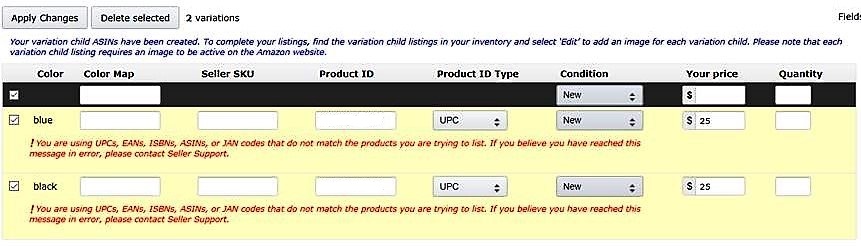
This is a very similar error to #1 and has the same foundational cause. You will see this message if:
- You are performing the Brand Name Error described above, or
- Your Amazon company is (or has become) Brand-Registered.
As of early 2018 (around March), Amazon changed its rules for Brand-Registered companies and now requires all of these sellers to rent their GTINs directly from GS1 going forward.
Solution
If your company is Brand-Registered:
- You must rent a separate block of barcodes directly from GS1 for any listings under Brand Registry.
- There is no workaround to use GTINs you own outright from Bar Codes Talk.
From our experience, Amazon has grandfathered in older listings, so this restriction only affects new listings submitted after Amazon changed the policy.
If you are stuck on Amazon
Most Seller Central messages are listing-field issues, not a broken barcode. Diagnose the message first. File a claim only if the barcode itself is the problem, or you have already tried those steps.
Common Seller Central messages and what to try first.
File a Works for Amazon or marketplace claim. Sign in with the email from your Bar Codes Talk purchase.